Ugly Byte: A Unique Pixel Display Font for Creative Projects
When it comes to choosing a font that stands out, Ugly Byte offers a distinctive visual identity. Designed as a pixel display font, it brings a retro aesthetic to modern design projects. Unlike traditional fonts that aim for clarity and legibility, Ugly Byte embraces imperfection and character, making it ideal for specific creative applications.
What Makes Ugly Byte Unique?
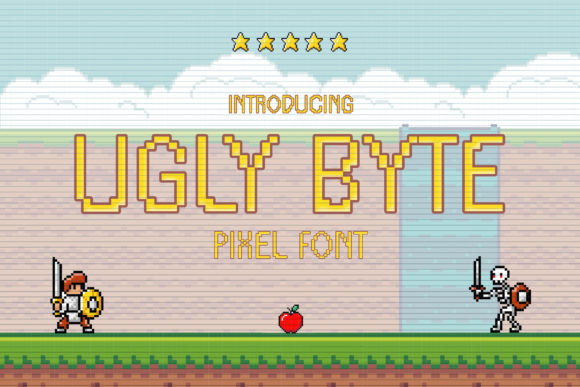
Ugly Byte is not your typical sans-serif or serif font. It is a pixel-based display typeface that evokes the look of early computer graphics and arcade games. Each character is crafted with a distinct, slightly irregular style that gives it a handcrafted feel. This intentional "ugliness" is what sets it apart from other fonts in its category.
The font’s pixelated structure makes it highly versatile. While it may not be suitable for long-form text due to its stylized appearance, it shines in short bursts of text where impact matters. For instance, using Ugly Byte in headlines, logos, or call-to-action buttons can create a strong visual statement.
One of the key features of Ugly Byte is its adaptability across different mediums. Whether you're designing for web, mobile, or print, the font maintains its character without losing readability in most contexts. Its low resolution and high contrast make it particularly effective on digital screens, especially when used in limited color palettes.
Comparing Ugly Byte with Similar Options
While there are many pixel fonts available, Ugly Byte has a unique position in the market. Fonts like Pixel Jelly, 8-bit Arcade, and Retronyms also offer a retro feel, but they tend to focus more on clean lines and uniformity. In contrast, Ugly Byte leans into the irregularities and inconsistencies of early digital typography, giving it a more organic and nostalgic appeal.
For designers looking for a font that conveys a sense of nostalgia or gaming culture, Ugly Byte is an excellent choice. However, if you're aiming for a more polished or professional look, other options might be better suited. The trade-off here is between visual uniqueness and overall usability.
Another point of comparison is how Ugly Byte performs in different environments. On mobile apps, for example, the font’s pixel nature can sometimes cause rendering issues depending on screen resolution. This means that developers must be mindful of how the font is applied and whether additional styling is needed to maintain its integrity.
Strengths and Limitations
One of the strongest aspects of Ugly Byte is its ability to evoke a specific mood or era. It's perfect for projects that want to pay homage to the past or create a playful, whimsical tone. Its use in retro-themed branding, video game interfaces, and interactive media can significantly enhance the user experience.
However, this same characteristic can also be a limitation. Because of its stylized appearance, Ugly Byte may not be the best fit for formal or professional settings. It lacks the elegance and consistency required for extended reading or official documentation. As such, it's important to consider the context in which the font will be used.
Additionally, while Ugly Byte is relatively easy to implement, its performance can vary across platforms. Web developers should test the font in different browsers and devices to ensure consistent rendering. There are also some cases where the font may not scale well at smaller sizes, which could affect readability.
Best-Fit Situations for Ugly Byte
Ugly Byte is best suited for projects that prioritize visual impact over readability. Here are a few scenarios where it excels:
- Retro Design Projects: Whether you're creating a vintage-inspired website, a themed poster, or a retro-style app interface, Ugly Byte adds a nostalgic touch.
- Mobile Apps and Games: Its pixelated look aligns well with the aesthetics of mobile gaming and casual app designs, especially those targeting younger audiences.
- Branding and Logos: When building a brand that wants to stand out, Ugly Byte can help create a memorable and visually striking identity.
- Interactive Media: Use it in animations, UI elements, or digital art to add character and personality to otherwise plain visuals.
In each of these cases, the font’s distinctiveness helps it stand out, making it a valuable tool for designers who want to make a bold statement.
When to Consider Alternatives
While Ugly Byte has its strengths, there are situations where alternatives might be more appropriate. If you need a font that is both readable and versatile, consider options like Roboto, Open Sans, or Helvetica Neue. These fonts are designed for a wide range of uses, from web content to print materials.
If you're working on a project that requires a more refined or professional look, you might explore other retro-inspired fonts that offer greater consistency and clarity. Fonts like Pixelify Sans or Orbitron provide a similar nostalgic feel but with a cleaner execution.
It’s also worth considering the technical limitations of Ugly Byte. If you’re developing a mobile application that needs to support multiple languages or require high-performance rendering, you may find that other fonts are more reliable and efficient.
Practical Examples and Comparisons
To better understand how Ugly Byte performs, let’s compare it with a couple of similar fonts in real-world applications:
Example 1: Mobile App Interface
Imagine a mobile app that targets a younger audience and wants to incorporate a retro gaming theme. Using Ugly Byte for the app’s title screen or main menu can instantly create a connection with users who grew up playing classic games. However, if the app includes a lot of text, such as product descriptions or instructions, a more readable font would be necessary.
Example 2: Website Header
A website that showcases retro technology or vintage fashion could benefit from using Ugly Byte in its header. The font’s character adds a layer of authenticity and charm. But if the site includes lengthy articles or blog posts, the font may not be suitable for body text, as it can be difficult to read for extended periods.
Example 3: Game UI Elements
In a video game, Ugly Byte can be used for scoreboards, health bars, or other UI elements that require quick recognition. Its pixelated style fits well with the overall aesthetic of many retro-style games. However, if the game involves complex menus or detailed text, the font may not be the best choice.
Making an Informed Decision
Choosing the right font depends on several factors, including the purpose of the project, the target audience, and the desired visual effect. Ugly Byte is a powerful tool for designers who want to make a bold statement with their typography. However, it’s not a one-size-fits-all solution.
Before finalizing your choice, consider the following questions:
- Is the font suitable for the intended use case?
- Will it convey the right message or emotion to the audience?
- Can it be reliably rendered across all platforms and devices?
- Are there any limitations that might affect the overall user experience?
By carefully evaluating these factors, you can determine whether Ugly Byte is the right choice for your project or if another option would be more appropriate.